FEATURES

Everything stays visible and editable.

From the first generated idea to the frame sent to the LEDs, DrumLight Studio keeps the complete show in one understandable workspace.
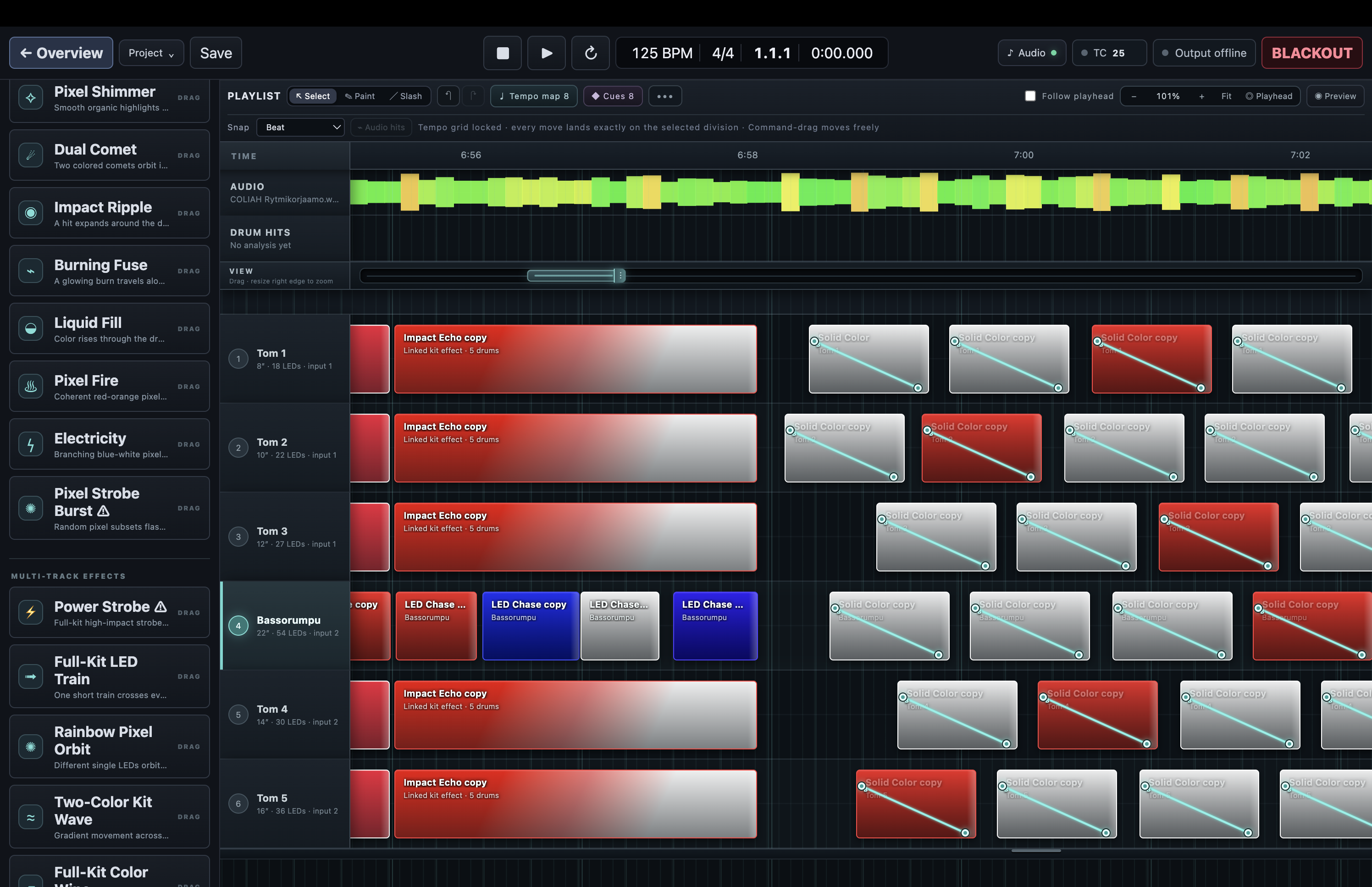
DrumLight Studio timeline with the Effects library, waveform and effect clips
01

Automatic creation

Get a complete, editable starting point instead of programming an empty timeline from scratch.

  • Generate a light show from imported audio
  • Choose calmer or more energetic show styles
  • Generate inside a selected loop region
  • Use detected drum hits as musical guides
02

A timeline for every drum

Work the way you would in a DAW, with one visible lane for every drum in the configured kit.

  • Drag effects from the library onto drum tracks
  • Paint, slice, copy, move, resize and multi-select clips
  • Snap to beats or edit freely in absolute time
  • Create loops, cues and full-concert timelines
03

Pixel effects and movement

Effects understand individual LEDs, individual drums and movement across the complete kit.

  • Single-drum and multi-drum effects
  • Scanners, trains, sweeps, pulses, strobes and impacts
  • One-colour, two-colour and gradient palettes
  • Custom effect creation and reusable presets
04

Detailed effect control

Every placed effect remains adjustable after it has been added to the show.

  • Colour, brightness, speed and direction controls
  • Graphical brightness and speed automation
  • Layer priority and effect blending controls
  • Edit multiple selected clips together
05

Audio and synchronisation

Build against one song or one uninterrupted concert soundtrack and keep the lights aligned.

  • Long audio files stream safely from disk
  • Colour waveform and visible drum-hit guides
  • Beat grids, tempo changes and absolute-time editing
  • LTC input with frame-rate and timing compensation controls — beta
06

Preview before output

See and audition the show without sending a frame to the physical LEDs.

  • Movable virtual drum kit
  • LED-by-LED visual preview
  • Optional drum-specific audition tones
  • Resizable preview and playlist workspace
07

Hardware output and safety

Controller setup and blackout behaviour are treated as part of the show, not an afterthought.

  • Guided drum, output and LED-range mapping
  • Brightness limits and adjustable output frame rate
  • Stop, disconnect and emergency blackout handling
  • Controller profiles with clear verification status
08

Projects that survive real work

The show stays editable, recoverable and portable throughout rehearsals and revisions.

  • Automatic recovery and unsaved-change protection
  • Reusable drum-kit templates
  • Undo, redo and non-destructive editing
  • Optional MIDI import and show export workflows

SEE THE PRODUCT

Look at the complete editing workflow.

Explore DrumLight Studio DAW